
Shopify AI code tool
This year has been a challenge. There have been a vast number of changes in the world of SEO. From the progress of AI tools to the volatility of Google Search, I can’t recall a period in which I’ve had to dedicate so much time to keeping on top of everything only for it to change weeks later. However, one bright moment has been the launch of the Shopify AI code tool.

What does the Shopify AI code tool do?
Firstly, if you use Shopify, it won’t surprise me in the slightest if this launch has gone unnoticed. While Shopify promoted the launch, it did so with far less fanfare than it usually would (and that remains a mystery to me).
Ultimately, the new Shopify AI code tool generates code that can add sections to your website capable of doing almost anything. It is a huge progression in the use of AI for website development and, were I someone reliant on web development as my form of income, a game-changer.

Who can use the Shopify AI code tool?
I’ve included this as a question because I want to make something very clear. With a degree of testing, playing (yes, I do think that is relevant in this instance), and honing of how you tell the tool what you want to do – anyone can use the Shopify AI code tool.
You can then sit back in astonishment as it works miracles. I don’t say that lightly. I am completely taken aback with the sheer power this tool puts at the fingertips of any Shopify site owner.

Shopify AI code tool demo
It might help if we take a look at what I’m talking about. Anyone with a Shopify website is used to working with what are known as sections. These are blocks of content on web-pages.
They range from slides to image blocks, rich text, videos, products, collections, and everything that constitutes an element on a page.
Add a Shopify page section
You begin by going to any website page on Shopify and looking on the left-side pane for the Template sections that show each of the page elements, such as the example shown below:
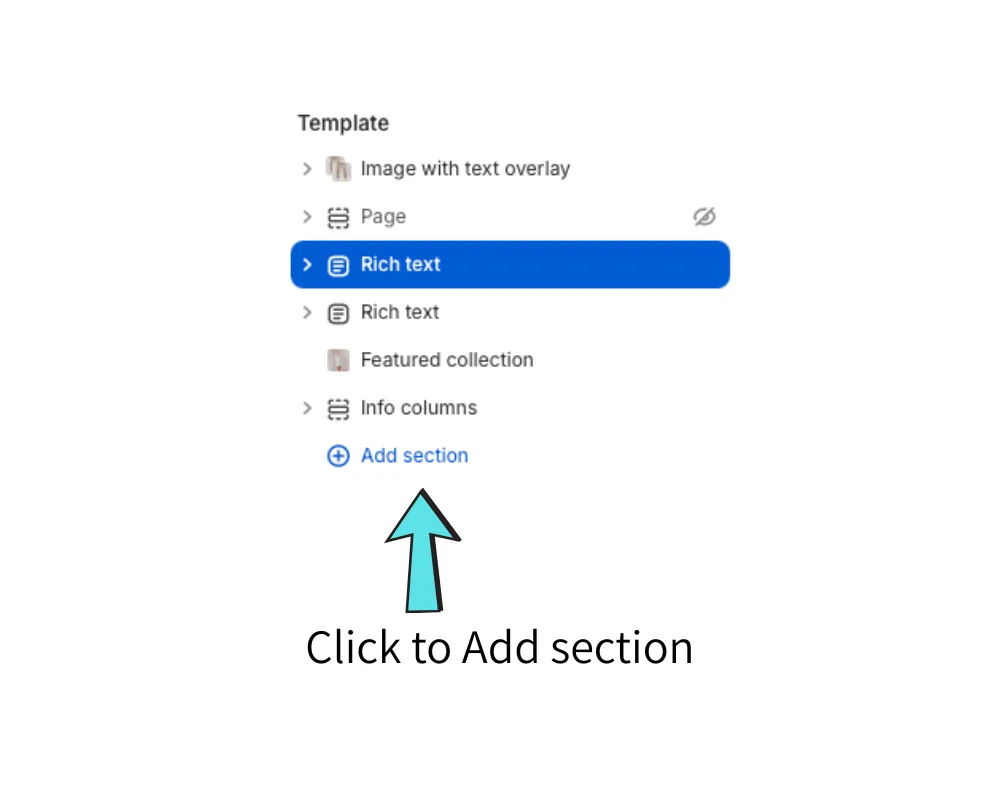
Click to Add a section and you’ll be shown the familiar choices of sections. This is where I’ve become aware that almost every Shopify user I know reverts to memory and doesn’t see the new option they have.
The Generate option is easily missed
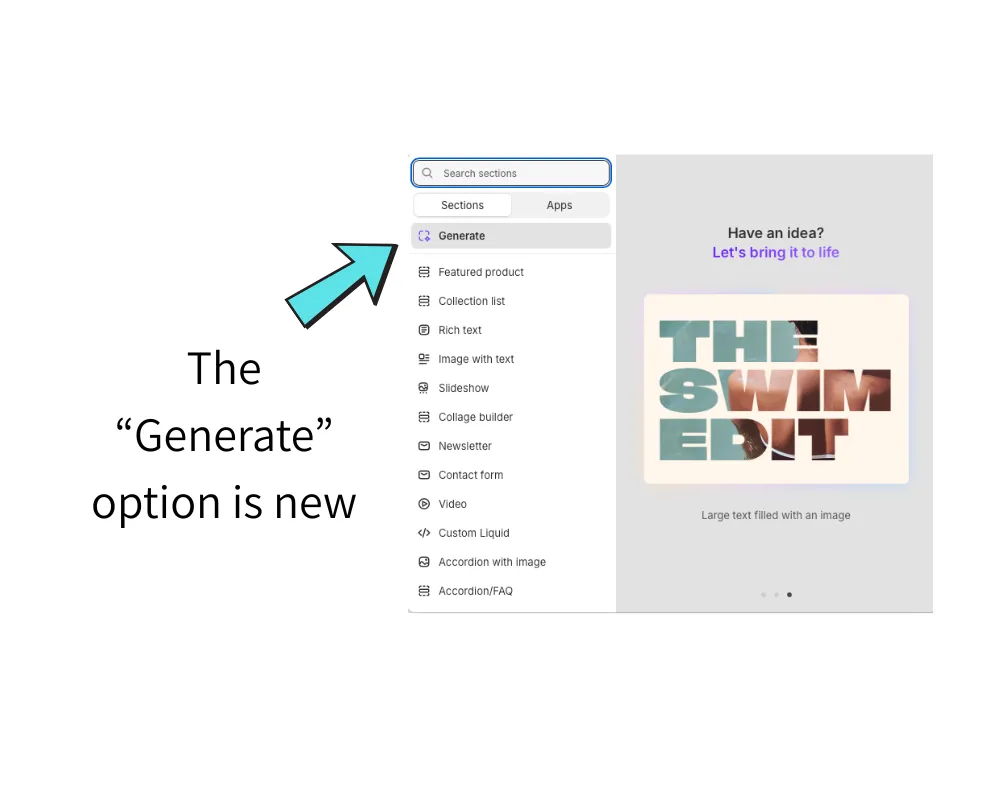
Most users become blind to new options in any website CMS or builder. They’re so used to selecting their most-used options that they don’t see anything newly introduced. That is definitely the case here.
A ChatGPT-style text box
Clicking on the “Generate” option unveils a new panel on the right-side of the screen, as shown below.
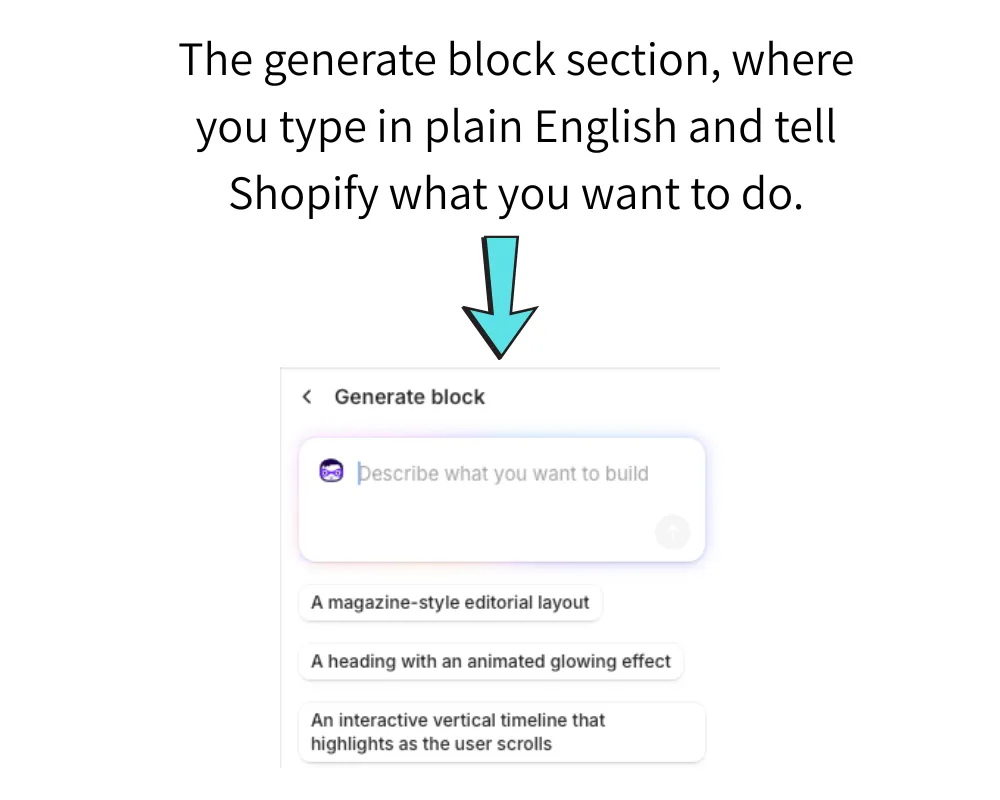
At this point, if you’ve ever used ChatGPT or another AI tool, you’re into familiar territory. Shopify provides a few examples of what you might want to ask it, but they’re weak and don’t give any indication of the true power of the tool you now have access to.
I’ll get straight into just what it is capable of with a real-world example.
How powerful is the Shopify AI code tool?
I typed this into the box (and I’ve copied and pasted it exactly as typed because it wouldn’t all fit into a screenshot):
Generate a 10 question quiz that asks the user questions and has the facility of some questions being image based, with 3 multi-choice answers. At the end of the quiz, give the user a score and categorise the total score as follows:
1-3: Oh dear, more revision needed.
4-7: Good effort, but not on the top rung!
8-9: Fantastic effort, almost top marks!
10: Superstar! You’re the best of the best!
As you can see from the above, that’s no simple request. It demonstrates the type of structure and multi-layered requests you can give. I added another paragraph asking for a button to be available for the user to restart the quiz.
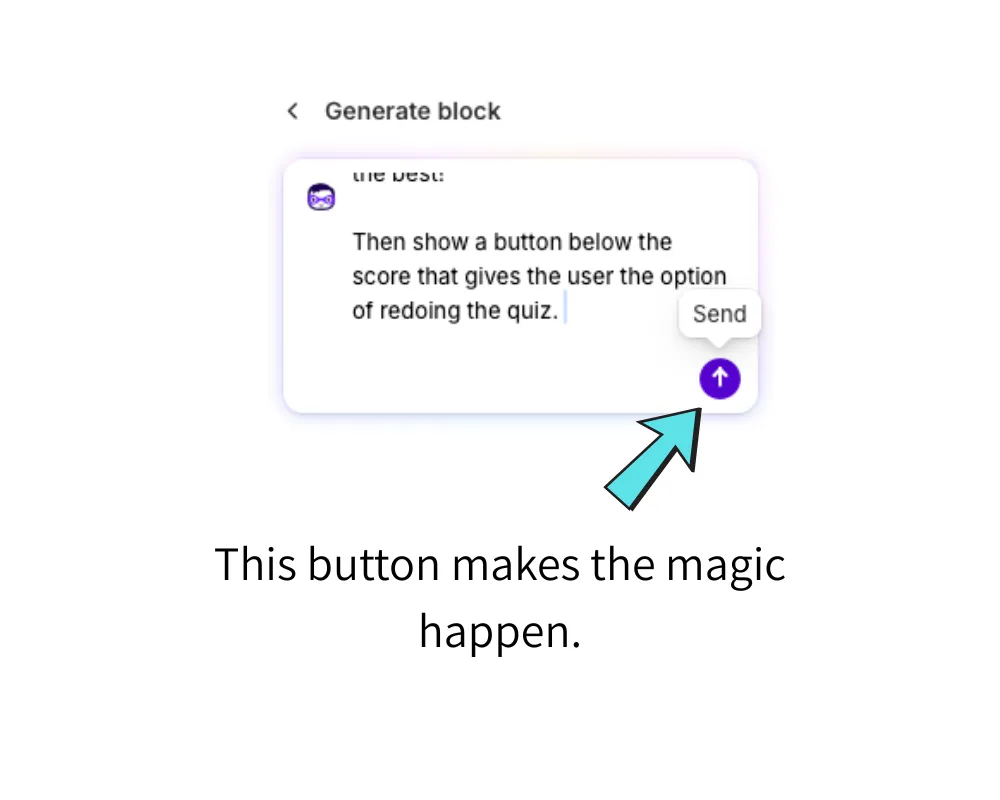
From there, you simply hit Return (or press the icon with an arrow in it that displays a tooltip of “Send” when you hover over it).
Watch as Shopify generates the code
As soon as you hit the send button, Shopify begins to generate the code. In this example, you’ll see the volume of code is significant. Imagine the time and cost of an internal or external web developer to write this for your site.
I recorded the full 3 minutes and 50 seconds of Shopify working it’s magic on this example, so you can see exactly what occurs.
TIP: To play this video, scroll to the bottom of it and click the play button, but I recommend you then expand to full screen mode using the [ ] button on the right of the video panel.
If you didn’t watch the video to the end, use the progress bar on it to go to the last 10-15 seconds to see what appears!
I’m going to show you screenshots of it from here.
Shopify AI code tool results
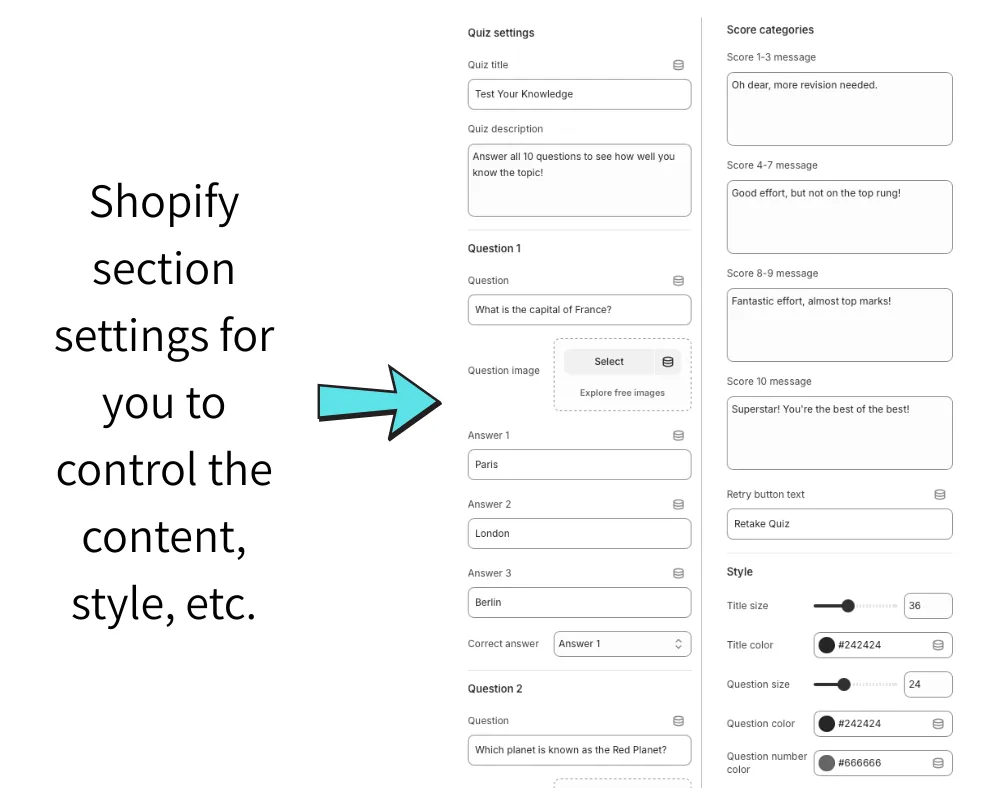
What Shopify produces from the above is nothing short of remarkable (at least in my opinion). The panel that showed the code being generated is replaced with the fields that constitute the settings for the quiz – allowing you to set the quiz title, questions, answers, any image based questions and the precise colours to be used on text, buttons and other elements.
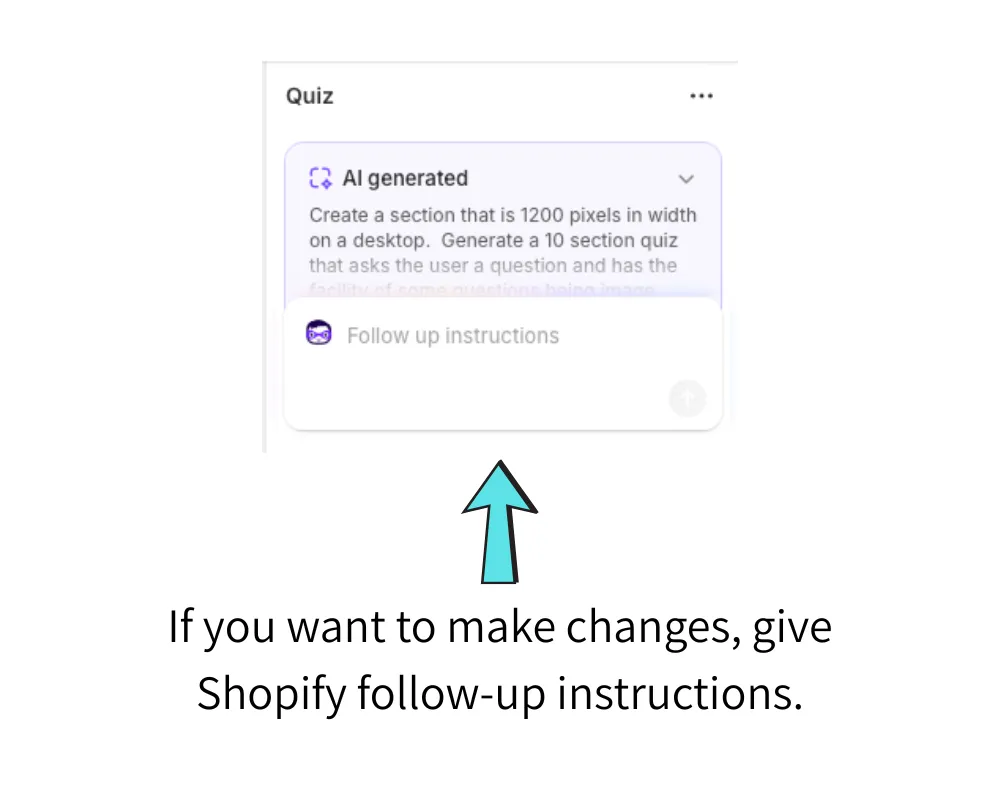
However, at the top of these settings you’ll see the option to give Shopify follow-up instructions. There could be things about the end result you don’t like, and this is your opportunity to fine-tune it.
Below, you can see some of the settings for the section that Shopify has created.
However, perhaps the most important result of all is how the code, settings and input fields translate to what the website end-user will see and interact with. That’s where the Shopify AI code tool shows just how well it can interpret plain English instructions and deliver an end-product that could be classed of worthy of publication.

What the Shopify website visitor sees
There are limitations to any first-draft of code that even the best AI tool can produce, but it is difficult not to be impressed by this result.
The user sees this before interacting with the quiz.

The UX (user experience)
The title can be changed, as can the sub-text, and you’ll note that Shopify has placed a thin black progress bar below it. This is a great example of Shopify’s tool understanding how the User Experience (UX) is important and it helps the user see how far through the quiz they are as well as adding a neat aesthetic touch.
There are Previous and Next buttons, although this is where you might question the first potential drawback. Why would you need a Previous button on the first question? The button doesn’t work as the section understands you can’t go back, but a Follow-Up instruction to the code tool might be to ask it not to show the button on the first question.
In the screenshot below, you’ll see that the selected answer is highlighted and the Next question button then becomes clickable.

Interactive components
As the user progresses to question two, the progress bar has moved and the Previous question button has become available.
You’ll note that the quiz didn’t give the user any indication as to whether or not they’d answered the first question correctly. However, I’ve produced another version of the quiz in which the immediate answer is given with the correct one highlighted in green and any incorrect answer given shown in red.
You can also produce a version of the quiz where no Previous or Next buttons are required, with the quiz simply delaying the display of the next question by an instructed number of seconds.

The quiz end is summarised as requested, giving a score and comment with the option of retaking the quiz.


Limitations of the Shopify AI code tool
It’d be dishonest to say that the tool isn’t without it’s limitations. That said, I’d be surprised if any Shopify store owner wasn’t impressed.
In producing the above quiz, here are a few limitations I’ve encountered. Some required a lot more consideration. A few were not solved without a degree of manual coding required.
- Section widths are difficult to instruct.
- Images used as questions can be problematic attention given to what dimensions they should be and how they should be displayed.
Tasks I’ve given to Shopify
Beyond the quiz, I’ve experimented with various tasks such as:
- Advanced forms for completion and submission
- Forms including document upload facilities
- Aesthetically pleasing layouts and section formats to enhance design
- Variations on slideshows and image sections
- Replacing the needs to use a paid-for Shopify App

What does this mean for developers?
The last item on the above list is particularly interesting or perhaps more concerning if you’re an App developer. For example, it is entirely possible to construct surveys with a minor change to how the quiz was instructed. Why would you need a paid-for survey app?
I’m not going to suggest that what the code tool can achieve will be as good as an app that has had hundreds or thousands of hours of experienced developer time, but, if you’re looking for a reasonably simple solution, why would you pay for an app when Shopify can produce it for you?

How can Shopify sites take advantage?
The benefits for Shopify store owners are almost unlimited in number.
- Greater control of page/store features
- Lower web development costs
- Speed of development could be dramatically reduced
- Ability to react to trends and customer demands is expedited
- Creativity and competitive edge is enhanced
- Potentially lower Shopify App costs
- Possibly removes the need to pay for custom Shopify Themes

Summary
In recent years, I think this is the best new feature added to a major e-commerce platform. The fact that it has been added to the world’s most popular makes the battleground with other platforms even more fierce.
From a Shopify SEO perspective, there are other advantages because of the way you can stipulate the importance of some criteria.
My advice is to leap on the new feature and experiment with it. There’s the possibility you won’t find it as easy to use as I’ve described, but the demonstration I gave is real and one of 5-6 I could very easily have chosen with equally impressive results.
Shopify has moved the game on yet again. It is another huge tick in the box that makes it an immensely powerful e-commerce platform.

Feedback
Have you tried the Shopify AI code tool yet? If you have, and have any feedback on it’s use, benefits and drawbacks, I’d love to hear them.
Leave a comment below and I’ll always reply when I can.

Leave a Reply